Author: Jimboy3100 This mod combines many scripts for agario game. It is based on ogario.ovh platform with all features,
and uses script codes such as auto-respawn, kitty insist reconnects for ffa/exp tokens and plenty
of other scripts that can be found on greasefork website. It works only as javascript / jquery
design palette script that works on the users terminal, using dynamic libraries from cloud,
but not sending any user information to the web. It also does not use any cheat codes,
but provides mathematical / programming scripts that help users play with comfort.
It also provides better ogario.ovh syncing support with the game and some basic game bug fixes to the
game itself
It also:
Auto Updates
Provides many features shown on the feature section
Is encoded
Has the best scripts and features than any other mod for agar.io (as far as i know)
Provides vanilla-like framework with one button click, for users who are used to vanilla game
Who we are
We are a clan named ℄LEGEND,
we use ℄ symbol to be recognised. We love agar.io. We are an active elite clan.
Communication is over discord.
We share ours scripts with everyone
We need
Modders, people who are used to scripting javascript / jquery or programming vb / asp.net Translators, we can offer the mod to any language, with one button click
Player design settings, share your game settings with everyone
Testers for the new beta versions
Support
If you like, please support the mod with any donation
LME is the biggest and quickest mod for agario
Legend Mod Express Features
Auto Updates
Unlimited FPS unlocked (quicker than Vanilla)
Old Skins (needs LME Expansion Pack)
Animated Skins (Not ready yet)
UserScripts Manager (URL or pasted)
Language Packs
Direct PARTY / FFA / EXP / TEAM server by using tokens / sips or connector
Search engine for player name / clan / tag / leaderboard / ip / token
Integrated Chat, minimap and teamboard. Chat rooms per server/per team password(or public)
New Template / skins / animations / zoom / respawn / helpers / hud controls and many extras
Themes for quite all textures and map (Basic / Menu / Hud / chat / minimap / graphics and cursor)
Banners for many clans (Email me your symbol and weblink for updates)
60++ Macros / Events / Hotkeys (Script does many calculations)
Tools for quests / youtubers / timers / coin auto digger / youtube video player
Send message pictures, videos and also various message commands directly to teammate's script
Change various textures, add photos on huds and clan's pictures and url links
Discord webhook handler's for sending IP, and many more...
No profile libraries, no Private Servers support, vanilla skins and other libraries are not
loaded
Legend Mod Mobile Features
Pure Agario with 2 buttons to split and W for mobiles / tablets to play PC Agario
LME Chat Commands
1. “Send a new agario server” - send your agario server link to users and suggest them to join
Message format: [srv]agario URL[/srv] Example 1: To send this server: http://agar.io/#2DUZJJ
put in the message: [srv]http://agar.io/#2DUZJJ[/srv]
Example 2: To send this server: http://agar.io/?sip=live-arena-1dzn7sm.agar.io&?r=EU-London&?m=
put in the message:
[srv]http://agar.io/?sip=live-arena-1dzn7sm.agar.io&?r=EU-London&?m=[/srv]
and to embed password "mypassword":
[srv]http://agar.io/?sip=live-arena-1rdujzy.agar.io&?pass=mypassword&?r=EU-London&m=[/srv]
*Due to limit of 60 chars on chat texts, users may experience less chars on the box, command
still works 2. “Show a URL on chat” - send your url link that users can visit on a new tab. Message format:
[url]URL[/url]
Example: To send this hyperlink: http://google.com put in the message: [url]http://google.com[/url]
3. “Suggest a video on chat” - send a youtube video on chat and suggest users to use it on mod
Message format: [yut]URL[/yut] To suggest this video:
https://www.youtube.com/watch?v=dQw4w9WgXcQ
put in the message: [yut]https://www.youtube.com/watch?v=dQw4w9WgXcQ[/yut]
4. “Show images on chat” - enables images from imgur.com or hizliresim.com Message format:
[img]URL[/img]
To send this image: http://i.imgur.com/mO44ZE3.jpg put in the message:
[img]http://i.imgur.com/mO44ZE3.jpg[/img]
5. “Show videos on chat” - enables youtube videos. Message format: [yt]ID[/yt] To send this
video: https://www.youtube.com/watch?v=dQw4w9WgXcQ put in the message: [yt]dQw4w9WgXcQ[/yt]
6. “Suggest a Discord clan / group on chat” - suggest users to join the Discord server
that you are in Message format: [discord]Invite URL[/discord] To suggest
our Discord server: https://discord.com/invite/JUfpR9k put
in the message: [discord]https://discord.com/invite/JUfpR9k[/discord]
*Abusing players or inappropriate use (spamming) will lead to user's permanent ban from usage
of LM extensions
Easter Eggs
1. Use name EasterEgg1 or EasterEgg2 and you will see! (not work on Legend Express)
Other Features
1. If uploaded your settings from LM, you can find them on this cloud: jimboy3100.github.io/themes/ ("your themes" section) by
inserting your Social ID
2. Automatically closes play.google.com/store if opened from agar.io (or this
page)
3. Agario Voice Chat
Rooms script (other mods and vanilla) for Voice Rooms to be enabled and
compatible with Legend Mod. [Don't install if using Legend Mod]
4. LM Project is combined multiscripts all working together from LM Project Library 5. Quick explanation on how to make video skins, sample
directory
User
comments
Best mod i ever used, simple and great!!! teodor bob
I was playing Agario for months without any mods but eventually decided to give them a try. I used
several, including agarinfinity, ogario and several others. By far, your mod excels on every
level with its exclusive, wide ranging features. It has made Agario playing undeniably the most
satisfying and interesting. Thank you for your time and effort in creating such a distinctive
tool ♔௹ЯΣΣΚ ௹IЯL
Stay up-to-date
Updates
November 2026 (build 3.547)
Multibox and page fixes: an enemy cell or a virus over your multibox unit is no longer hidden, the Zoom glide speed slider works again, the player 1 multibox ring is off by default, the page loads the patched jQuery 3.7.1 and Bootstrap 3.4.1 again with fresh files after each update, and the Vanilla, OGARio and Delta loader links show an info page again.
Expanding Land Teams uses WebGL: Teams frames are drawn by the faster WebGL renderer (it was always Canvas), with the same team colours, no skins and the team pie on top; agar.io Teams stays on Canvas.
Server list fixes (agar.io): servers that closed or never answer leave the list after three failed counts in a row (also when matchmaking still hands them out) and are forgotten once scans stop finding them, a server that comes back keeps its number, and a scan no longer counts the same server again and again.
Private rooms (Expanding Land): pick Private room in the Private list to create your own FFA or Teams room (bots, map size, max players, optional password, public or hidden) and share its code or link, join a friend's room by code, or pick one from the public rooms list. Rooms save nothing (no shop or rewards there).
Fixes with the WebGL renderer: agar.io custom skins show again (that frame is drawn by Canvas), "Show grid" works without WebGL2, split guide, merge rings, death particles, spawn burst and team pings show above cells, the virus shot sound plays, and the gamepad LB button only swaps between existing multibox units.
Net graph (hotkey) shows which renderer drew the frame: WebGL or Canvas (Canvas off = WebGL turned off in settings, Canvas reset = waiting after a GPU reset).
Gamepad stick dead zone slider (Mouse settings, next to Gamepad support): how far the stick must move before the cell follows it; 0.2 as before.
Expanding Land Teams: Teams mode (pie, team colours, leaderboard) no longer switches off when you press Play, come back to the tab or the map grows; the pie fits phone screens.
Expanding Land Teams leaderboard: the Leaderboard box lists the teams with their share of the map, biggest first, your team highlighted.
Private rooms: a Share button in the room window opens your phone's share sheet (WhatsApp, Discord, ...) with the room link.
Game Over card: a Share button (phone share sheet, or a tweet) with your mass and time alive. New hotkey Reconnect to the previous server (unbound; the last 10 servers are remembered, not replays or private room tickets). Show the player id (#id) before chat nicks (chat settings, off by default).
Badges: the profile stats (click your profile picture) show badges earned from your account stats (games played, highest mass, mass consumed, time alive, level; on Expanding Land also #1 and players eaten in your last 50 games), with a toast when you unlock a new one. Hover or tap a badge to see what it needs.
Expanding Land: in Teams, team chat (Enter and the phone quick chat buttons) reaches your team mates without a clan tag; the Game Over card's "Eaten by" row has a Watch killer button that spectates and follows the cell that ate you.
Leagues: the Leaderboards window counts down to the weekly reset ("Resets in 2d 5h"), Player Profile Stats show your Average Mass, and the "passed you" toast says which leaderboard (World, Country, your League or Friends).
Direction on touch (mobile, gear panel, off by default): like agar.io, the cell moves toward where your finger touches instead of using the joystick; drag to steer, lift to keep going.
Split prediction (agar.io, Helpers, off by default): with Cursor tracking on, the split lines of cells that will not split on your next split (16-cell limit, under 35 mass) are dimmed. Triple split range (Helpers, off by default): rings around enemies 8x your mass or more, who can triple-split onto you.
Phones: the Split, Feed, 4x and 16x buttons on the right stay visible again while the menu is open (they only ignore taps there, so the menu still works).
Close room: the player who created a private room can close it for everyone (room window, Close room, then confirm), also after reloading the page on the same device.
Chat translation works again: the translation service it used was shut down; it now uses the translator built into the browser (Chrome 138+, on your device, nothing is sent anywhere). Turn it on in the chat settings.
Private room fixes: friends in the same room now share team chat and the minimap, Copy in a room copies the room link, older room links open the room window, Reconnect and server search skip Private room, the room window shows when you are in (it closes after Join), no double join while connecting, and a full room right after a drop asks you to try again in a few seconds.
Expanding Land Teams: new server in the Private list. Three teams (red, green, blue), team mates cannot eat each other, and the leaderboard shows the teams pie. Log in as usual; Teams keeps its own progress, separate from FFA.
Daily challenges on Expanding Land: two new challenges each day (eat players, survive, reach the top, eat viruses), each met in one life, with progress and a Claim button in Challenges and Claim All.
Team pings: new hotkeys (no default key) mark Help, Danger, Go here or Virus here at your cursor for teammates, on the map and minimap (Delta players see a wave).
On phones: optional team ping button (tap = Go here, hold and slide for Help, Danger or Virus here) and net graph in the touch settings (gear), replay pause and seek buttons with a bigger touch replay bar, and windows that fit short landscape screens with bigger close buttons.
Spectating: optional "click a player cell to follow it" in free spectate (click empty space to stop), and on Expanding Land World Spectate an optional "click the minimap to move the camera there" (both off by default, in the HUD options).
Accessibility: a "Colour-blind safe (high contrast)" theme preset, a "Reduced motion" option and settings preset (no screen shake, death particles or join spin), and in free spectate you can follow a leaderboard player: turn on "click a leaderboard mass to follow" or bind "follow next leaderboard player".
Settings presets (Competitive, Battery saver, Streamer, Clean HUD) next to the settings search, with Undo, plus NEW badges and a "Show new options" filter for recently added options.
Expanding Land events: when the server runs an event (Double XP, potion rain, golden food, virus storm), a small countdown appears at the top of the screen ("Double XP: 05:10 left"); hide it with "Hide the server event countdown" in the stats options.
User scripts can now react to spawn, death, chat, server, mass and leaderboard events with window.LMEvents instead of patching the mod (how to use it).
Settings in your language: settings, theme and hotkey labels now follow the language you pick in the Legend Mod language menu: Greek, Spanish, Bulgarian, French, Arabic, Chinese, Russian, German, Turkish and Dutch, not only English and Polish. Labels without a translation stay in English.
Match history on Expanding Land: when you are logged in, the window has an Account (server) tab with your last 50 games stored by the server, so your history follows your account to every device.
Smoother FPS in busy servers: a skin that is still loading (or broken) no longer drops every cell to the slow renderer.
Same camera and zoom speed on 60, 144 and 240 Hz screens.
Line lock (Limit position) now aims straight up, down, left and right too.
Feed macro keeps the speed you set (it fed about 30/s at 60 FPS when set to 50/s).
Merge ring and merge timer now show the same time.
Google sign-in on legendmod.ml and in Expanding Land now uses Google's current sign-in (the old one was blocked there).
Faster reconnect (first retry after about 1 second) with a message if the server stays down.
New setting Record replays (turn it off to save memory).
Faster loading: no redirect per file, a much smaller jQuery UI, updated jQuery and Bootstrap with security fixes.
Settings: split-macro delays, Performance mode, Anti-aliasing, Download/Load settings files, Copy debug info, last private server remembered.
Expanding Land: clear messages when a login or purchase fails, quest timers count down, the Game Over card no longer blocks the mouse.
Mobile: the settings panel opens (gear button), the joystick aims at the right angle, fast split taps are no longer dropped.
Replay links (?replay=) to files on this website load again, and skipping in a replay is fast.
Chat: no more false advert blocking of normal words, the chat only scrolls when you are at the bottom, muted players stay muted after a reconnect.
Server, party and login messages in your language; logging out of Google lets you pick another account.
Hotkeys: holding a key while setting a hotkey no longer breaks it, permanent feed stops when you die, HUD buttons no longer split or feed when clicked.
Auto respawn: no menu flash while respawning, and a quick death right after spawning is handled (it could leave you stuck).
Multibox: your main cell no longer freezes when the second unit disconnects or reconnects.
Theme templates (Legend Helper) keep your profiles, hotkeys and chat commands; exports include hidden profiles.
Expanding Land: Esc closes only the top window, potion buttons cannot be pressed twice, logout closes all shop windows.
New: settings search box, a Bound keys list in Hotkeys, a session summary under the menu, an optional FPS limit (saves battery), and a hotkey to toggle Performance mode.
New options (off by default): time alive in the stats, mass in the tab title, desktop notification when someone mentions you, rainbow map borders, HUD blur, clock format, merge rings on/off. Server and party boxes now suggest your last 5 joins.
Expanding Land: hotkeys for Leagues, Shop, Challenges, Potions and Claim All; Claim All shows when something is ready; optional reminder bell. Mobile: optional quick chat buttons, multibox button, and vibration settings.
New: replay pause, speed and seek hotkeys; multibox view and ring hotkeys; optional sounds for 16 pieces and viruses; optional trail of your path on the minimap; a copy button on the Game Over card. Replays no longer jump to the end at Start.
New: replay progress bar (click to seek), hotkey to enlarge the minimap. New options (off by default): collapse repeated bot names on the leaderboard, a toast when you move up the leaderboard, a mass graph on the Game Over card. Virus sounds now work on every server.
New: Up/Down in the chat box recalls your last messages; game brightness and saturation, zoom glide speed and rainbow border speed sliders; custom symbol for background sectors. New options (off by default): camera on the centre of mass, NO FOCUS warning, stats at the bottom centre. Pasting a party link in search no longer leaves a dark overlay.
New options (off by default): all-time personal bests with a New best! badge on the Game Over card, ping jitter next to PING, 25 FPS while the menu is open, mobile Stop on release. Hotkey to copy the server link.
New option (off by default): Match history, your last 50 games (mass, time alive, who ate you, server, mode) in a window under the menu.
Grid no longer shimmers or shakes while moving; the multibox camera follows your unit smoothly.
Scan Trick: the hotkey is called "Hold Scan Trick" and the game tells you when no key is set. Cloud settings are protected with a sync code.
New option (off by default): Gamepad / controller support in Mouse control. Left stick moves, A split, B feed (hold), X double split, Y respawn, RB 16 split, LB multibox swap, Start menu, right stick zoom.
Making replay iframes
Save your replay and upload it as file or as raw .lm on the web
(If you want to use github see this repo: https://github.com/dkyriak/dkyriak.github.io)
Use https://jimboy3100.github.io/play?replay= and then your file url
Url examples:
Iframe example:
Mega FFA promo
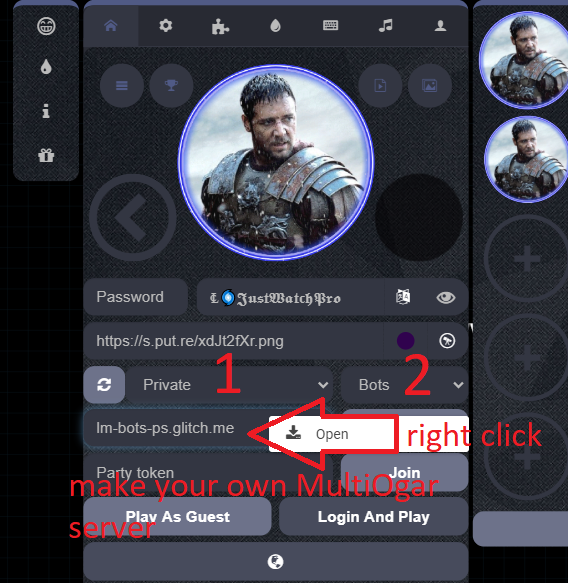
Make your own server
⚠️ READ AND APPLY! THESE ARE IMPORTANT ⚠️
Best Performance values
Settings -> Frames per seconds -> Limited Rate + 4ms delay (suggested) More FPS do not always mean better rendering.
Limited FPS delay is suggestred from the Video "window.requestAnimationFrame(drawRender.render)"
Unlimited FPS delay is 1-15ms (average 4.5ms on Chromium) "setTimeout(function()
{drawRender.render()}, 0)" - read more Slow PC need "Limited Rate + 8ms delay" (Reason: Javascript runs some functions asynchronously)
The Preliminary:
Reducing Graphics. Themes -> Graphics/Cursors -> Graphics significantly change the performance
SUPER IMPORTANT:Ethernet cable internet has the most important
role on connection Ping, prefer Ethernet than WIFI
SUPER IMPORTANT:Call to provider and refer to enable “fast pack”,
mention that you play internet game, it is a free service. Gamers need quick response (PING)
SUPER IMPORTANT:Go to chrome://settings/system , ensure the Use
hardware acceleration when available checkbox is checked (you'll need to relaunch Chrome for
any changes to take effect)
Go to chrome://flags/ , ensure that Override software rendering list is "Enabled" (you'll
need
to relaunch Chrome for any changes to take effect)
Update Chrome to latest version: chrome://settings/help
Prefer Opera GX Go to chrome://flags, Ensure that Disable WebGL is not activated (you'll need to relaunch Chrome
for
any changes to take effect). This feature might not be shown, as already been enabled on new
Chrome Updates
Update Legend Mod to latest version from jimboy3100.github.io
Conflicts:
Some players experience conflicts that cause great FPS drop, bugs or even crash.Top reasons:
Ad blockers, (Must be disabled)
Sometimes Chrome enables its own Ad blocker that disables cookies. You must even disable all blocks
to other cookies (youtube, miniclip, xsolla, etc) because they affect agario
Cookie blockers, (Must be disabled)
Chrome Extensions, chrome://extensions/ , Other extensions rather than Tampermonkey, AgarioScripts
must be disabled. Not both Tampermonkey and AgarioScripts Userscript managers used
Other Tampermonkey (top right button->dashboard) or AgarioScript Userscripts. Use 1
Userscript at a time
Performance notes:
Top performance killers which should be OFF on a low-end PC:
Ghost Cells
Skins
Jelly Physics
Skins on teamboard
Background sectors
Background grid
Rainbow food
Names (disable names or use “Auto hide name” option)
Some tips to get more stable FPS:
Use “Optimized names” and “Optimized mass” option
Use “Auto hide mass” option
Use “Short mass” option
Disable auto zoom
Choose agar.io servers that are close to you
Do not use any kind of helpers if you don’t need them. Less to draw means better performance
Try different browsers (Chrome, Opera, Vivaldi)
Also prefer using:
talky.io/ voice chat tools, from the game itself (“Voice and Camera Chat” button).
It makes chat rooms per IP/token, per password tag. This way we get rid of the extra information
that Discord/raidcall/teamspeak voice rooms send
Users of other mods or Vanilla, can use the utility and be compatible, if they use this script:
https://jimboy3100.github.io/agarscripts/Voicechat.user.js or Agario Voice Chat rooms - GreaseFork
*Please avoid asking me questions about the mod, there are so many requests
Game uses Server-client Application as author (don't disturb asking questions) of Agar.io describes on the
article The protocol of each server (communication, etc) is passed through ws:// (e.g
ws://live-arena-18qspzk.agar.io:80 ) websocket masked by Cloudfare, and handled by node.js MultiOgar uses uWebSockets (other socket that can be used: socket.io ).
Barbosik implied UwebSockets on Barbosik/MultiOgar Latest decryptions of the agar.io
protocol by NuclearC and issy123 github libraries. Example of watching protocol
Play Agario on tablet / mobile
Agario Mobile
On a phone or tablet, open www.legendmod.ml/play.html:
the touch controls (joystick, split, feed) load automatically.